While the Spark app works on any device, it is specifically designed to look great on phones. It’s easy to check the day’s numbers or look at recent insights no matter where you are. Spark is installed from a web browser instead of the Apple App Store or Google Play. It’s just as easy to install, and you avoid the 30% fee charged by the app stores. Here are the steps to install Spark on your phone:
- Open a web browser on your phone (typically Chrome, Safari or Firefox).
- Go to secure.getasprk.com.
- Log in with your existing Spark account (Facebook login, Google login, or email/password), or create a new account if you haven’t already.
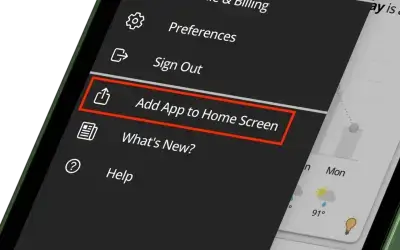
- Open the side menu and tap Add App to Home Screen. Follow the prompts.
- Close the web browser.
- Click on the Spark icon that was just added to your phone’s home screen. You will need to log in one more time.
That’s it. From this point on, just open the app from your home screen like any other app. You will not need to log in again. If you run into any issues with this, please contact us at support@getaspark.com and we’ll be happy to help.